Restaurant table booking and ordering, how it works
For restaurant, café and bar owners · last updated November 2026
Every Zaags website can take table bookings. This page shows every setting you control, what your guests receive, what it costs, and how your own domain works. You can also try it for real on our demo restaurant.
🧪 Try it live: Demo Café
A fictional café with most options switched on. Take the 🧭 tour, then book a table: you receive the real confirmation email. Nobody is expecting you, and test bookings are deleted automatically within 24 hours.
- 1. Price
- 2. Lunch and dinner services
- 3. Tables and seating areas
- 4. Table time, slots, party size
- 5. What the guest sees and receives
- 6. Cancelling and blocking
- 7. Deposits (optional)
- 8. Your own domain (monrestaurant.fr)
- 9. Your data and GDPR
- 10. Ordering for pickup (click & collect)
- 11. What it does not do (yet)
1Price
| What | Cost |
|---|---|
| Website with table booking, with a few small Amazon product suggestions at the bottom of the page | €39.99/year |
| Same, with no ads at all | €59.99/year |
| Fee per reservation, per guest or commission | None |
| Free trial | 14 days |
| Online deposits (optional) | 2% Zaags fee (min €0.30) + Stripe's card fee; bank transfer or Revolut: no fee |
| AI Visibility add-on (optional, not needed for booking) | €99/year + its AI checks in credits |
| Reading your menu from a photo or PDF (optional) | credits (new accounts start with free credits) |
| Connecting your own domain (optional) | €49 once |
All prices include VAT; your invoice shows it. Plans renew yearly and you can cancel any time (no further renewal).
2Lunch and dinner services
In Opening hours, each day of the week is either closed or has one or two services, for example 12:00 to 14:30 and 19:00 to 22:30. Guests can only book inside those services. On the demo: lunch and dinner Tuesday to Saturday, brunch only on Sunday, closed on Monday.
3Tables and seating areas
- Up to 3 seating areas (for example Inside, Terrace, Private room). With more than one, the guest chooses the area.
- In each area, list your tables by size: how many tables of how many seats (1 to 30 seats each).
- Each area serves lunch, dinner or both (the demo terrace is lunch only).
- Switch any table size or whole area off in one click (bad weather, room closed), and back on later.
- Tables are allocated automatically: a booking only goes through if a free table of the right size exists for the whole table time, so a table is never booked twice.
4Table time, slots, party size
| Setting | Your choice |
|---|---|
| How long a table is kept | 30 minutes to 6 hours (default 1 h 30) |
| Time slots offered | every 15, 20, 30 or 60 minutes |
| Minimum notice before a booking | you set it (e.g. 1 hour) |
| How far ahead guests can book | 1 day to 1 year |
| Largest party online | your largest table; bigger groups are asked to call you |
| Phone number | optional or required, with an optional "this number is on WhatsApp" tick-box |
| Last seating | automatic: the last slot leaves room for the table time before the service ends |
5What the guest sees and receives
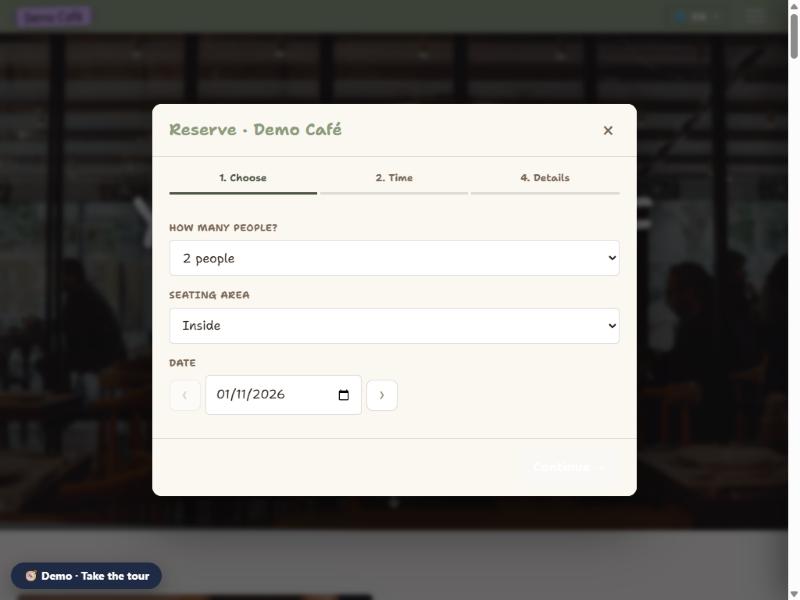
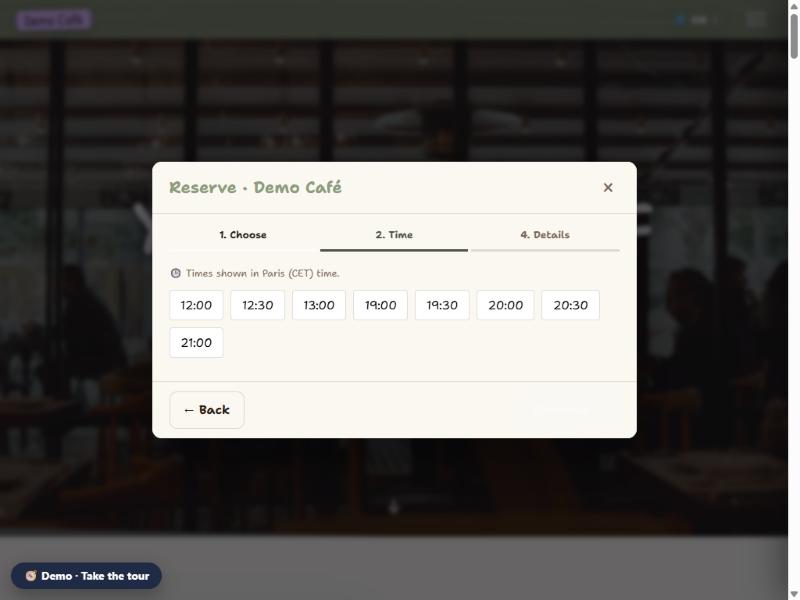
Screenshots from the demo restaurant: lunch slots stop at 13:00 and dinner at 21:00 because the table is kept 1 h 30 and the services end at 14:30 and 22:30.
- On your site, Reserve opens the booking window: date, party size, seating area, then the free times for lunch and dinner.
- Name, email (and phone if you ask for it), an optional note.
- An email confirmation straight away, with the date, time, party size, your address and add-to-calendar buttons.
- A reminder email before the visit (24 hours by default, adjustable, or off).
You receive an email for each booking, see it in your bookings list and on your phone in the Zaags app, and can have it added to your Google Calendar automatically. Booking emails can be sent from your own mailbox. SMS is not available.
6Cancelling and blocking
- Guests cancel or change a table booking by replying to their confirmation email or calling you. (Online self-cancellation exists for room stays, not yet for tables.)
- You cancel a booking in one click from your bookings list; the table is free again at once.
- Block: close weekdays; switch off a table size or an area; hold a private event that blocks the whole restaurant for a time window; block times from a calendar feed (iCal) or whenever your Google Calendar shows you busy.
- Export all bookings to a spreadsheet (CSV) at any time.
7Deposits (optional)
You can ask for a deposit or full prepayment to confirm a booking. Card payments go straight to your own Stripe account; Zaags keeps a 2% fee (minimum €0.30) per payment, on top of Stripe's card fee. You can also offer bank transfer or Revolut; those bookings stay "awaiting payment" until you mark them paid.
8Your own domain (monrestaurant.fr)
Your site is always included at zaags.app/s/your-name. If you want guests to type monrestaurant.fr instead:
| Cost | €49 once (VAT included), on top of the yearly plan. No yearly domain fee from Zaags. |
| Who owns the domain | You. It stays in your name at your registrar; you can point it elsewhere at any time. |
| Your email at that domain | Not affected: only the website lines change, your mailboxes keep working. |
| Is anything installed on my hosting? | No. Your domain simply points to Zaags, and the site keeps running on Zaags servers. You need no hosting, no WordPress, no updates. |
| Do I get the website's code? | No. Zaags is a service: the software stays ours and is not handed over. What is yours is your content (texts, photos, menu) and your bookings and customer data, which you can take with you (see below). |
9Your data and GDPR
- Yours: your guests' details and bookings belong to you. You are the controller, Zaags is your processor under our GDPR Data Processing Agreement (Art. 28), accepted in the app when you start using bookings.
- Stored with our hosting provider PlanetHoster (Canada / France; Canada has an EU adequacy decision), encrypted in transit, backed up daily. Only you can see your bookings; Zaags staff have no screen showing them.
- Leaving: bookings and customers export to CSV at any time; ask us and we send a full copy of your texts, photos and menu, free.
- Sub-processors are listed in the Privacy Policy. Zaags never uses your guests' data for marketing.
10Ordering for pickup (click & collect)
Switch on Click & collect and guests can order from your menu, pay by card and pick the food up. Try it on the demo restaurant: nothing is charged there, and the order appears on its kitchen screen.
| Setting | Your choice |
|---|---|
| Preparation time | 5 minutes to 3 hours (the first pickup time is at least this far away, also after opening) |
| Pickup times | every 10, 15, 20 or 30 minutes, within your lunch and dinner services |
| Most orders per pickup time | 1 to 99; a full time disappears, so the kitchen is never flooded |
| Order ahead | today only, or up to 6 days ahead |
| Pause | 15 min, 30 min, 1 hour or the rest of the day, from the kitchen screen |
| Payment | card when ordering (Stripe); 2% Zaags fee (min €0.30) + Stripe's card fee, no monthly fee |
Kitchen screen: open its link on any tablet or phone in the kitchen (no app, no sign-in on the tablet; the link is the key, and you can replace it at any time). Orders are sorted by pickup time; orders due within 10 minutes turn orange and late ones red. Each card shows the dishes with their options, the guest's note, their phone number and that it is paid.
Payments: you connect your own Stripe account once (Payments tab). Money goes straight to your Stripe account and Stripe pays out to your bank on its usual schedule. Refunds are made from your Stripe dashboard. Every order also appears in your Orders tab and can be exported.
11What it does not do (yet)
- No SMS confirmations or reminders (email only).
- Guests cannot cancel a table booking online themselves; they reply to the email or call.
- No table plan drawing: you describe tables by size and area, and the engine allocates them.
- No link with TheFork or other booking marketplaces.
- Click & collect: no delivery drivers, no till (POS), no Uber Eats or Deliveroo link, and no paying at the counter (orders are paid by card when placed).
Ready?
Try the demo restaurant · See all website features and the FAQ · Zaags compared with other platforms · Questions: contact at zaags.app