ZaagsForce for HubSpot

Customer conversations, answered.
Repetitive admin, never forgotten.

Connect your bot to HubSpot. An AI assistant that answers your customers in seconds from your HubSpot (on WhatsApp, email and your website) and hands the conversation to your team, with the record right there, when a human should step in. Plus a built-in CRM that reaches out for you: scheduled appointment reminders and invoice nudges, with a one-tap pay link. No HubSpot yet? It also runs as a standalone assistant grounded in your own knowledge & website. Also works with Salesforce, HubSpot and WooCommerce.

€49/mo Essentials · €79/mo Pro (adds the CRM + payments, 200 conversations) · WhatsApp +€19/mo · no seats · your data stays in your HubSpot and your Drive

Quick start four steps

HubSpot is optional, connect it for record-aware answers, or run it as a smart general assistant grounded in your own knowledge.

1 · Choose your channels

Pick where customers reach you, WhatsApp, your support mailbox, a website chat widget, Telegram. Add any mix; the assistant behaves the same on all of them.

2 · Connect HubSpot optional

Ten minutes, with a guide for your admin, for answers from a customer's own records and hand-overs as Tickets. No HubSpot? It still works as a generic assistant grounded in your Knowledge and website.

3 · Set your rules

Your hours, languages, what it may answer (and which topics), when to hand off, and who gets alerted. Test it privately in the sandbox first.

4 · Start

Switch it on. It answers what it can, hands the rest to your team with full context and a drafted reply, and everything lands in one dashboard.

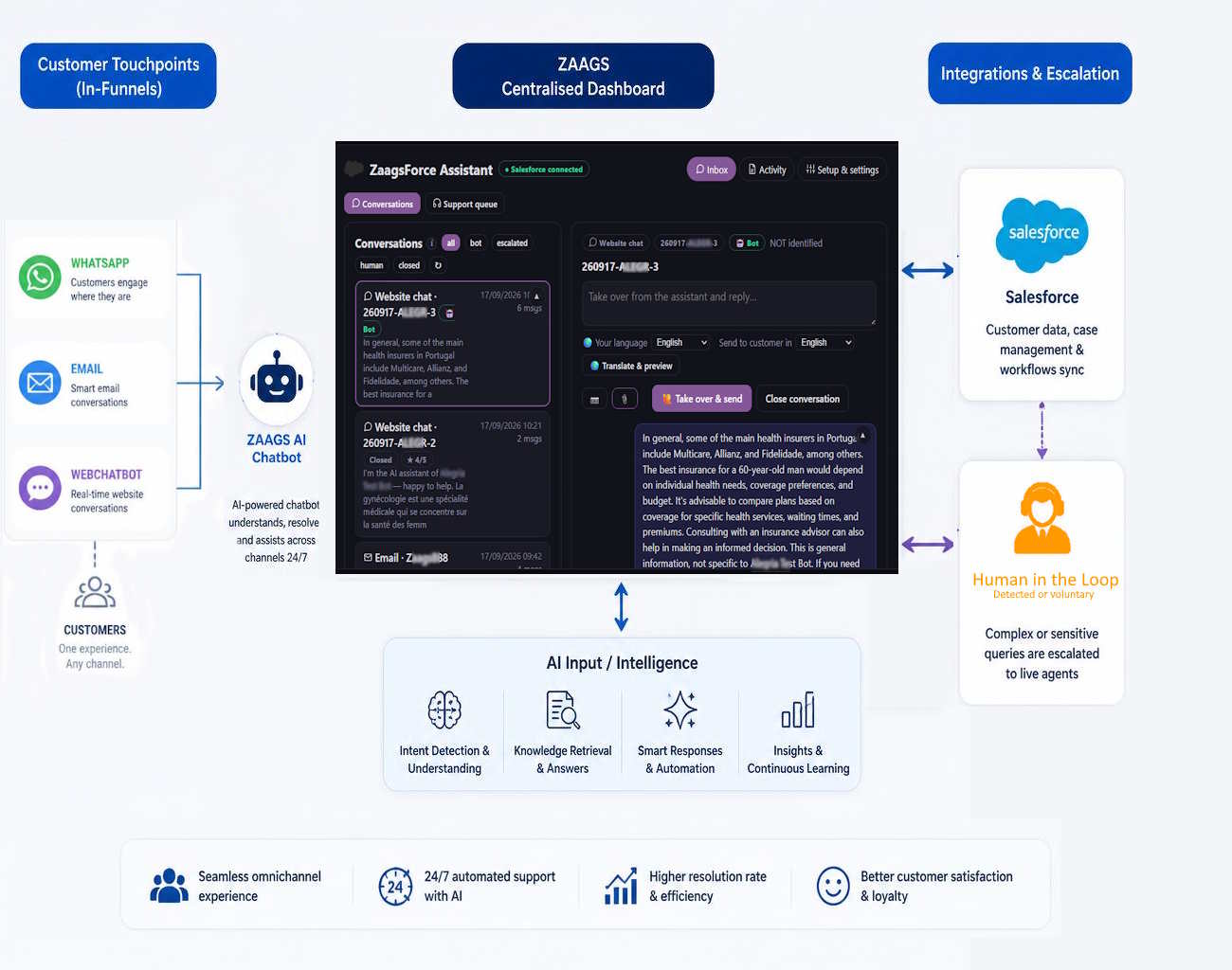
How the ZaagsForce Assistant handles a conversation, from customer message to answer or human hand-over

Why teams choose Zaags

Enterprise-grade AI for HubSpot, at a fraction of the cost, and without touching your HubSpot setup.

💸

Flat pricing, no seat fees

Simple monthly tiers from €49 for 100 conversations, not per user and not per resolution. Your whole team can pick up hand-overs without buying a licence for each person.

🧩

Zero-footprint integration

Nothing is installed in your HubSpot. It connects over the standard API in about ten minutes, and works on a strict, hard-coded read/create list, it can log a hand-over but has no code path to update or delete your data.

🪪

Verified before anything personal

It cross-references the incoming phone or email against your records, then requires a one-time passcode before it reveals any order, ticket or appointment, so automated support stays personal and GDPR-compliant.

📲

Hand-overs outside the console

When a human is needed, your team is alerted on Telegram, Slack or email with the HubSpot snapshot and a pre-drafted reply, and answers from one tapped link, no extra seat and no Zaags account required.

📊

See every agent's performance

A built-in per-agent analytics view shows how many conversations each teammate handled and resolved, their response & handling times, leads, clients, value won and customer rating. Give each person their own login (2FA recommended) and you get a clear, manager-level picture of your whole team.

🧰

Your whole team, fully equipped

Every agent's login also unlocks the whole zaags.app suite at no extra cost, 40+ tools: AI chat, mail, calendar, tasks, documents, bookkeeping and translation, so the account that answers customers also runs their day.

📣

It doesn't just answer, it reaches out

Every other assistant waits for the customer to write first. Zaags is the one that also starts the conversation: a built-in CRM turns your HubSpot into scheduled, on-brand outreach, appointment reminders, invoice reminders with a one-tap pay link, overdue-invoice follow-ups and win-backs.

Build the templates once your logo & signature are added automatically, choose who to reach (everyone with a visit in the next X days, an invoice due or overdue, or all clients), and pick auto-send or hold in an Outbox for review. It runs on your schedule, skips anyone who opted out, and never double-messages. Support and revenue, from one assistant.

Ideal for busy, people-facing teams

Built for small and mid-sized businesses that answer the same questions all day and chase the same reminders. It saves your team hours, keeps every customer answered in seconds, and never lets an appointment or invoice slip.

🏥

Clinics & medical centres

Appointment questions, results chasing and pre-visit instructions answered instantly, plus automatic reminders that cut no-shows, while the front desk focuses on the patients in the room.

🦷

Dental, vet & aesthetic practices

Bookings, recalls and treatment follow-ups handled 24/7; overdue invoices nudged with a one-tap pay link, no awkward phone calls.

⚖️

Law, accounting & advisory firms

Status updates, document requests and scheduling taken care of, with every sensitive answer gated behind identity verification.

🔧

Repair, trades & services

“Where's my repair / order?” answered from your records, jobs handed to the right technician, and review requests sent automatically once the job is done.

🏠

Property & real-estate

Viewing requests, tenancy questions and maintenance reports triaged round the clock, with the right person alerted for anything that needs a human.

🛍️

E-commerce & retail

Order status, returns and product questions answered straight from your store, with win-back and reorder nudges that turn support into repeat sales.

The outcome is the same everywhere: save your team time, make every employee more efficient, and lift customer satisfaction with instant, accurate, round-the-clock answers.

Part 1 · The assistant

Customer conversations, answered

Every message that comes in on any channel, gets an instant, grounded reply, or a clean hand-over to your team.

📚

Answers it can prove

Every factual reply is grounded in your published Knowledge articles or the customer's own records. No source, no claim, it says so and offers a person.

🪪

Verifies who's writing

Matches the number or email to your Contacts, then verifies with a one-time code before sharing anything personal. You set the level per type of data; nobody can ask about anyone else's record.

🧭

Support and sales, one assistant

Routes by intent: support questions use your Knowledge and records; a new prospect can be logged, only if you switch that on, and ask-first by default.

🚨

Seven ways to reach a human

“Talk to someone”, an unsure answer, frustration, a loop, a high-value account, topics you flag as always-human, or the assistant's own judgement.

🔒

Exact write list

It logs hand-overs, notes and follow-ups in your HubSpot, each switchable, and nothing else. It cannot update or delete anything. You cap it at the connection with a read/create scope.

🗂️

Your HubSpot clients, one click

A built-in Data HS directory: search your customers and open a full dossier (details, orders, appointments and history) right in the console.

🌍

Every customer, their language

The assistant replies in the language each customer writes in. And in the console an agent can translate an incoming message into their own language, then write a reply in their language and have it sent in the customer's language, with a preview before it goes.

📎

Send files & images

Agents can attach a document (PDF, Office, CSV, ZIP) or an image to a reply, delivered as a real email attachment, and shown in the conversation.

🎯

General AI, on your terms

Beyond your Knowledge, let the assistant answer general questions from its own AI, either everything, or only topics you choose (e.g. “diabetes, nutrition”). Anything AI-sourced is clearly labelled as general information, not official business facts.

✉️

Real email, done right

Replies send under your business name, quote the original and thread under the customer's message. Senders are checked with DKIM, and mismatched Reply-To / unauthenticated mail is flagged for your agents.

📪

Per-mailbox control

Each support mailbox has its own logo & signature and its own auto-close, after N minutes of silence it wraps up (with a rating request, or quietly), even after a human took over.

🗄️

Your data, your storage

Conversations are archived in your own Google Drive or Supabase, hand-overs live in your HubSpot as Tickets, and Zaags keeps a working copy for seven days only.

Part 2 · The CRM , Pro

Repetitive admin, never forgotten

The assistant doesn't only wait to be asked. Turn your HubSpot into scheduled, on-brand outreach, reminders, invoice nudges and win-backs that go out on time, every time.

📣

Programmable outreach tasks

Schedule tasks that target a live HubSpot list, an appointment in X days, an invoice due within X days, an invoice unpaid for X days, or all clients, evaluated fresh on every run and sent on your schedule.

🎨

Your templates, your brand

Ready-made templates (appointment reminder, invoice due, overdue) with your logo & signature built in. Edit in a visual editor or in raw HTML, with one-click merge fields.

🕹️

Auto-send, or review first

Each task sends automatically or holds messages in an Outbox for you to check and send with one click. New tasks start off until you switch them on, nothing goes out by accident.

🛟

Never the wrong customer

Anyone on your do-not-contact list is skipped, a frequency cap stops overlapping tasks double-messaging, and you can include or exclude specific clients per task.

💳

Get paid in a tap

Invoice reminders carry a secure pay link pre-filled with that customer's amount & reference, and an agent can send one right in a live chat too. The customer pays on Stripe, money lands in your account, and it's logged on their HubSpot record. Zaags takes a small per-payment fee.

What it writes to your HubSpot, the complete list

A promise, not a summary: the software has no code path for anything outside these.

✓ It can create (each on/off)

  • A Ticket when a human is needed, with the transcript and why
  • A Note logged on that Ticket or Contact as the conversation continues
  • A Contact for a brand-new prospect, ask-first by default, never a duplicate
  • A Task logging a finished conversation on the contact (off by default)

✕ It never

  • Updates or deletes any record, no stage changes, no closing tickets, no “fixing” a property
  • Creates or edits Deals, Companies or your pipelines
  • Shows a customer anything about another customer, or anything from Deals
  • Starts WhatsApp conversations or sends marketing

ZaagsForce vs per-seat helpdesk AI (Intercom Fin, HubSpot Breeze)

The same “answer & reach out” outcome as a dedicated support-AI product, at a fraction of the cost and without per-seat licences.

ZaagsForceTypical support-AI tools
Price modelFlat €49 / €79 per month, no per-seatPer seat and/or per resolution, cost climbs with team & volume
Extra conversations€0.49 each (only beyond your bundle)Metered per resolution / message
Team seatsIncluded, the whole team handles hand-oversCharged per agent / seat
IntegrationZero-footprint, standard HubSpot API, ~10-min connect (or run without it)Often its own paid plan or an app to install
Safety on your dataHard-coded read/create-only, can't update or delete anythingVaries, frequently broad read/write access
Proactive outreachBuilt-in CRM, scheduled reminders & invoice nudges with a pay linkUsually reactive, outbound is a separate add-on
ChannelsWeb, email, Telegram; WhatsApp +€19/moVaries by plan / add-on
Best forSMB & mid-market on HubSpotTeams wanting a large standalone support suite
100 customer conversations a month cost €49 on ZaagsForce, flat, for your whole team, versus per-seat + per-resolution pricing that grows with every agent and every ticket elsewhere, and outreach is built in rather than a separate product.

Two simple plans. No seats.

No per-seat fees, your whole team is included. It runs on the HubSpot you already have instead of replacing it. All prices include VAT.

Essentials
€49 / month

The assistant, answering & hand-over
website chat + email channels
100 conversations/month included
Data HS client directory & dossiers
hand-overs to email, Telegram, Slack & HubSpot

Pro most popular
€79 / month

Everything in Essentials, plus the CRM:
Programmable outreach tasks & branded templates
Pay-by-link, get paid in the chat & in invoice reminders
200 conversations/month included

WhatsApp channel
€19 / month

Our connection fee, per WhatsApp Business number · direct on WhatsApp's official API · no per-message fee from Zaags
Meta's own message fees may apply, paid to Meta in your own account (a monthly free tier, then per-message by category). Most small businesses stay within it.
One-off setup €500 + VAT if you need us to connect it

Extra conversations
€0.49 each

Packs of 100 for €49, 200 for €88 (10% off)
or 500 for €210 (15% off)
packs never expire while subscribed

Onboarding
€2,000 + VAT, once

Done-with-you: we connect HubSpot, map your fields, build your Knowledge/Playbook and run the first tests
WhatsApp connection is a separate add-on (€500 + VAT)
maintenance on request: €100 + VAT / hour

A conversation = one thread, from the customer's first message to close, whether the assistant resolved it or handed it over. 14-day trial on website chat + email, with the full Pro feature set to try. Pay-by-link and the CRM outreach engine are part of Pro.

Set-up guides

Written for your admin, your IT and your data-protection officer. Each one prints to a clean PDF.

Questions

The assistant, answering & hand-over
Which HubSpot editions work?

Every HubSpot plan works, including the free CRM: the assistant uses HubSpot’s standard API. The Service Hub Knowledge Base is optional but is what makes “how do I…” answers good.

Do I need a new WhatsApp number?

A number connected to WhatsApp's API can't also be used in the consumer WhatsApp app (in Europe there is no exception), so most businesses use a dedicated mobile number. A landline can also work WhatsApp verifies it with a short voice call instead of an SMS, as long as it isn't already active in the WhatsApp app. Your team answers hand-overs from the alert links or the dashboard, on any phone or computer.

What happens when the assistant isn't sure?

It keeps answering everything it reasonably can, general help and anything grounded in your Knowledge or the customer's own records. It only hands off the specific request that genuinely needs a person (or that a customer asks a human for): it says so, alerts your team with the transcript, the customer's snapshot and a drafted reply, and pauses on that conversation until someone replies. It never guesses at prices, dates or policy, but it doesn't bail out of questions it can answer.

Does my team need Zaags accounts?

For day-to-day work, yes, and it's the best way. Each teammate signs in with their own (Google) Zaags account and works hand-overs from the operator dashboard: take over a chat, reply, translate, attach a file, assign to a colleague, resolve. It's fully responsive, so they can do it from a phone on the go. Alerts also arrive in the tools you already use (email, Telegram, Slack/Teams and your HubSpot) and you can reply from a one-tap link without an account; handy in a pinch, but the dashboard gives the most control.

A Zaags account is more than the support console. Every teammate also gets the whole zaags.app suite at no extra cost, 40+ built-in tools behind their single login: AI chat, mail, calendar, tasks, documents, bookkeeping, translation and more, so the same account that handles customers also runs their workday.

We strongly recommend a separate login per person (and switching on 2-factor authentication): it keeps each agent's actions their own, so your per-agent performance stats stay accurate and you, as manager, get a clear view of who handled what. Billing and AI spend always stay with the account owner, never the individual agents.

Can I see how each agent is performing?

Yes, the console has a built-in analytics view with a per-agent performance table. For each teammate you see how many conversations they handled and resolved, their average response time (business hours) and handling time, the leads they captured, how many became clients, the value won, and their average customer rating (★). Account-wide you also get automation rate, time-to-human, conversion and pipeline, plus per-conversation detail you can export. This is exactly why we recommend a separate login per agent (with 2FA), it's what makes these numbers trustworthy.

Which languages does it handle, and can my team reply across languages?

The assistant automatically replies in the language each customer writes in. In the operator dashboard your team can translate any incoming message into their own language, then write a reply in their language and have it sent to the customer in the customer's language, with a preview before it goes. When it answers from general AI knowledge rather than your own, it says so.

How are the AI costs charged?

AI usage (answering, drafting and translating) is metered in Zaags credits and billed to the account owner (the manager), never to individual agents. Everyday replies cost only a few cents each; you can cap spend and top up in prepaid packs. Building your knowledge base (reading files and your website) uses credits too and is included in the one-off setup. Prefer your own AI account? You can bring your own key (BYOK), the assistant then runs on your provider at a reduced Zaags service fee.

Are there usage limits or per-seat fees? (our big advantage)

No per-seat pricing, ever. One flat plan covers your whole team, add as many agents as you like at no extra cost. Each plan includes a bundle of conversations (100 on Essentials, 200 on Pro); beyond that, extra conversations are just €0.49 each in prepaid packs, and the AI behind every reply is metered in cents with a spend cap you set, so there are no surprise overage bills. Compare that with per-conversation (around $2) or per-user ($5–$550/user/month) pricing elsewhere.

Which tools does it integrate with?

CRMs: Salesforce, HubSpot and WooCommerce (connect one, or run with none). Customer channels: WhatsApp, email, a website chat widget and Telegram, any mix, same behaviour on all. Team alerts & hand-overs: the operator dashboard, plus email, Telegram, Slack/Teams and your CRM. Payments: your own Stripe (Pro). We keep the integration list focused and deep rather than a long list of shallow connectors.

Audit trail, permissions & compliance?

Audit: every hand-over becomes a record in your HubSpot (a Ticket) with the full transcript, timestamps and reason; the operator dashboard logs who took over, replied and resolved. Permissions: each teammate signs in with their own account; the owner/manager controls settings and spend, and the CRM connection is capped by a permission set to a strict read/create allowlist (it can never update or delete your data). Compliance: GDPR-aligned, identity verification before any personal data is shared, your conversations stored in your own Google Drive or Supabase and your CRM (Zaags keeps a working copy for 7 days only), DKIM-signed email, and the EU-required “you're talking to an AI” disclosure on the first reply. A connection can be locked to a single fixed IP. Formal SLAs and a DPA are available on request for larger accounts.

What are the WhatsApp (Meta) fees exactly?

The €19/month is our connection fee per WhatsApp Business number, there's no per-message fee from Zaags. Separately, Meta runs WhatsApp's official API and may charge its own messaging fees, billed in your own WhatsApp/Meta account. Meta gives each number a monthly free allowance and then charges per message by category (service, utility, marketing); most small businesses answering customers stay within or near the free tier. Rates vary by country and change over time, so check Meta's current rate card for your region before any high-volume marketing. (A one-off €500 + VAT setup applies only if you'd like us to connect WhatsApp for you.)

Do I need HubSpot to use it?

No. HubSpot makes answers record-aware (a contact's own tickets, deals and orders) and logs hand-overs, but it's optional. Without it, the assistant still runs as a smart general assistant grounded in your own Knowledge and website, answers on every channel, and hands off to your team. Pricing is the same either way, it's per conversation and channel, not per platform.

How do you handle our HubSpot access & tokens?

Through your own HubSpot private/OAuth app, we never hold your password. Access tokens are encrypted, never plain text; the assistant can only read a short allowlist and create Tickets/Notes/Contacts/Tasks (never edit or delete); disconnecting revokes the token at HubSpot; and every call comes from a single fixed IP you can lock the connection to. Full detail: HubSpot security & your tokens ↗.

The CRM & payments , Pro plan
Can it reach out to customers, not just answer?

Yes, that's the built-in CRM (on the Pro plan). You build branded email templates (your logo and signature are added automatically) and set up programmable tasks that target a live HubSpot list: an appointment in X days, an invoice due within X days, an invoice unpaid for X days, or all clients. Each task runs on a schedule and either sends automatically or waits in an Outbox for you to review. Anyone on your do-not-contact list is skipped, a frequency cap prevents double-messaging, and new tasks start switched off until you turn them on, so nothing goes out by accident.

How do payments work?

On Pro, you connect your own Stripe once. Then an invoice reminder can carry a secure pay link pre-filled with that customer's amount and reference, and an agent can also send one inside a live, identity-verified chat. The customer pays on Stripe's hosted page you never touch card data, the money lands in your Stripe account, and the payment is logged onto their HubSpot record. Zaags takes a small per-payment fee (there's no card on our side).

Can it tell customers it's a bot?

It must, the first reply in every conversation says it's the AI assistant of your business, as EU law requires. Customers can always ask for a person.

Put your HubSpot on the front line.

Sign in, connect your HubSpot, and test your assistant in the sandbox, in minutes, before any customer sees it.

Open the Assistant →